
Overview
This article will guide you on how to submit your travel preferences to the Concierge team for more complex travel arrangements. This will ensure your notifications for upcoming trips are accurate, reflecting your child's actual travel requirements and preventing incorrect notifications.
Examples of complex travel patterns (non-repetitive) include -
1. Split households - requiring access to more than one stop or route
2. Non-standard travel patterns - your child's travel pattern is not repetitive each week (eg, week 1 - Monday, Tuesday and Wednesday. Week 2 - Monday, Thursday and Friday)
3. Multiple passes required - access to different stops and routes. (eg, AM and PM stop differ)
Please note: if your child travels the same days each week and uses only one stop, you can book as normal through the booking page. There is no need to complete the form in this instance.
How to access the Booking Concierge form
The form is available on your school’s booking page.
You can find a direct link to this page in the emails you have received.
Returning students
When completing the form, please ensure the details match those on your Zeelo account (e.g. name, email address, and phone number of the Primary Account Holder).
New Students
Please create a Zeelo account and add your children as a linked rider before filling out the form.
Pre-admission students (specific to certain schools)
If you are new to the school and do not yet have a Zeelo account, you can still complete the form. Please use the details held by the school for the Primary Parent.
Important: Pre-admission students insturctions are only linked to certain schools. Please ensure you read the invite email and follow the steps advised to know which approach you need to take.
In July, you will receive an email invitation to join the Zeelo platform and set up your account. You should accept this invitation using the same email address registered with the school.
Click on the link to the form that you need to complete, see image below for guidance -
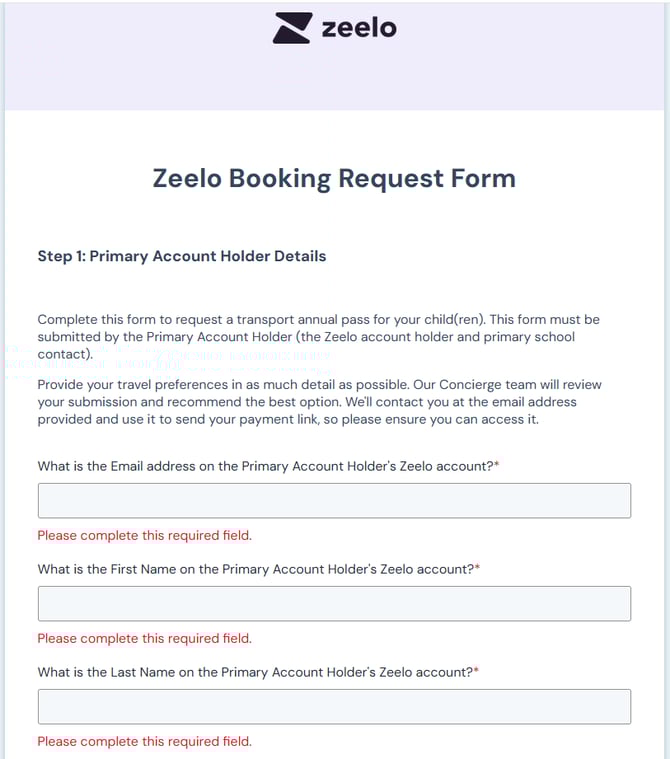
Completing the Booking Concierge form
Please provide as much detail as possible when completing the form to ensure the Concierge team fully understands your needs. If you are not sure which stop you require access to, you can enter your postcode, and the team will find the best stop for you based on your location. Towards the end of the form, there is a field where you can add comments to give the team more information about your travel preferences. Also, if it's easier to discuss your enquiry, you can request that the team call or email you directly at a day/time that suits.
Once you submit your form, you will receive a confirmation email, and the team will be in touch within 24 hours of receiving your request.
Please note: The Concierge team is available Monday to Friday 0800 - 2100 and Saturday 1000 - 1400.
Important: Submitting the Travel Preference form does not guarantee you a seat. Payment must be completed to secure the pass, and upcoming bookings must be made to ensure a seat.
What happens next?
The team will review your request and find the pass(es) that best suit your needs. You will receive an email with a payment link to secure your pass. If you require access to multiple passes, then you may receive an email with multiple payment links. Once payment has been completed, the team will book your travel requirements and send you confirmation when this is complete.
Important: The payment link on the email will only be valid for 6 days, after this time it will expire and we will assume you do not wish to proceed with the request. We encourage you to make your payment as soon as possible to secure your seat and avoid disappointment.
If you require access to multiple passes, then you will receive more than 1 payment link within the email. All of which will need to be secured via payment for the team to proceed with your bookings.
Please note: By proceeding with your payment, you agree to the Concierge Terms and Conditions displayed on the booking page.
Payment Received
Once you have completed your payment within the 6-day time-frame, the team will apply the passes to your account and place the relevant bookings on your behalf to match your travel requirements. The passes will be visible on your account within 24 hours however, the bookings will not appear until the week before the start of your child's academic year (late August). Please do not worry if you cannot see the trips. This is perfectly normal, and these will be visible in the app closer to the first day of term.
Please note: For some schools, the bookings will appear in July. We will notify these parents by email when this happens. For all other parents, it will be updated on the Sunday prior to the start of the new term.
Bookings are released in 2-week blocks.
New bookings for the following 2 weeks will automatically appear each Sunday after 1 am—no action is required from you.
Please note: It may take a few hours for bookings to appear in your app, but they will be available from Sunday.
How to change your travel preferences
You can change your travel days in the app or on ridezeelo.com. Go to your home screen (on the web-app, select Bookings & passes in the account menu), select the pass, then Pass settings, then Automated booking. Navigate to the child you wish to amend and select the new days of travel, and select confirm. See image below -
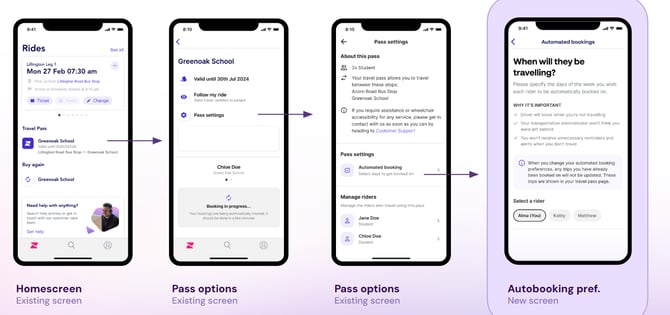
Because all travel requests are updated on a Sunday at 1 am, any changes you make will not take effect immediately for trips in the current week. For example, if you make these changes on a Tuesday, they will not be updated until the following Sunday for future trips. Any trips in the current week will remain the same, so if you need these updated, please reach out to the team for assistance -
-
Email at bookingconcierge@zeelo.co
- Call 020 4634 9039
FAQs
What is a travel preference request?
-
A travel preference request lets you indicate your preferred journeys, stops, or schedules for upcoming trips. These preferences help shape future services.
Does submitting a travel preference guarantee my seat?
- No, submitting a preference is not the same as booking. Seats are only confirmed once you have secured your pass by making your payment via the payment link that has been emailed to you.
Why should I submit a booking concierge form?
Your preferences help improve the service by:
- Identifying demand for routes and stops
- Supporting route planning and optimisation
- Managing change requests to provide accurate notifications for upcoming trips
- Helping ensure services match rider needs
What if my preference isn’t available?
Not all requests can be accommodated. This may be due to:
- Trip is at capacity (no seats available). In this situation, the team will suggest alternative routes and stop options for you to explore.
How will I know if my request has been considered?
You’ll be informed via:
- Email updates through the process until your request is confirmed
Who do I contact if I need help?
You can contact Zeelo support via:
- Concierge email (booking support) - bookingconcierge@zeelo.co or call 020 4634 9039
- General enquiries email- please view this article on how to contact our team
Article Owner
Suzie Mercer