
This article explains how to delete your Zeelo account depending on the platform you use: iOS App, Android App, or Web-app.
1. For iOS App users
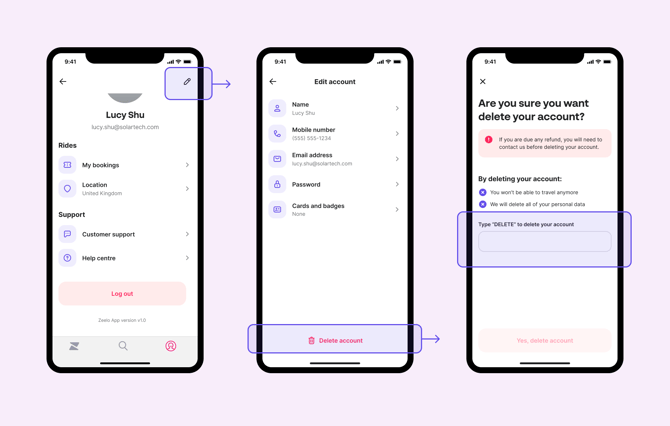
1. For iOS App usersYou can delete your Zeelo account directly in the iOS Rider App. Follow the steps below:
- Log in to the Rider App
- Open the "Account" tab in the bottom right of your screen
- Tap on the "Edit ✏️" icon in the top right of your screen
- Tap "Delete account"
- Confirm the deletion by typing "DELETE"
2. For Android App users
Deleting your account directly within the Android App is not currently supported.
In line with GDPR guidelines, you can request to have your Zeelo account information deleted by getting in touch with our contact center at any time.
3. For Web-app users
Deleting your account directly within the Web-app is not currently supported.
Under GDPR, you have the right to request deletion of your Zeelo account data at any time. To submit a request, please contact our support team.
Under GDPR, you have the right to request deletion of your Zeelo account data at any time. To submit a request, please contact our support team.