How can I link my child to my account?
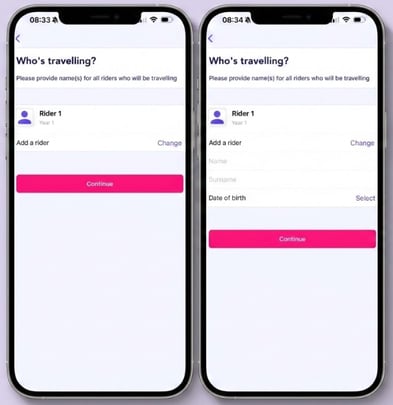
To link your child to your account, purchase a pass for a school service. During checkout, you will be prompted to enter your child's name and date of birth — this links them to the pass.
Select “Add a rider” and enter the child’s first name, surname, and date of birth.
How does my child board the service?
Currently, Zeelo does not support sharing account access with an additional user. All passes and bookings are visible only when logged into the parent or guardian’s account. For older students, you can set up the account in your child's name so they can manage their own purchases and bookings.
To allow your child to board, you can print their QR code directly from your Zeelo account. A printed QR code is fully valid and can be scanned by the driver at boarding.
The same QR code is used for all of your child’s bookings, so you only need to print it once. This process helps ensure your child can board smoothly and safely, even without a mobile device.
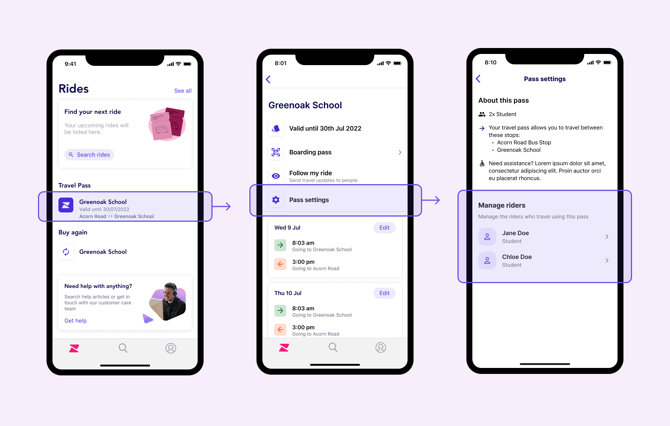
How do I change or swap the details of the riders linked to a Travel Pass or Ride bundle?
- Open a Travel Pass or Ride bundle from the rider app home-screen or "My rides" on the web-app
- Select "Pass settings"
- You will see a list of riders linked to this pass
- Tap the rider's name you wish to update and follow the on-screen prompts to edit their details.