

How to Suggest a New Stop for Your Zeelo Service
At Zeelo, we strive to provide flexible and convenient travel options. If you have a Zeelo program you’d like to use, but there’s no stop near your location, you can suggest a new stop! It’s easy, and we’ll let you know whether or not the suggestion is successful.
How to Suggest a New Stop:
-
Visit the Booking Page:
Start by visiting the booking page for the destination you’re interested in. Here, you’ll find details of the available services and the stops. If you need support locating your booking page, please visit this help article here. -
Look for the "Suggest a Stop" Button:
On the booking page, you’ll see a button to suggest a new stop. Click on this button to proceed. See the image below for guidance -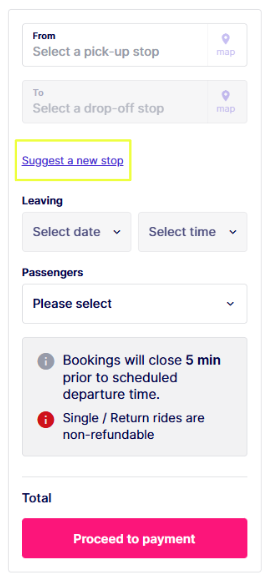
-
Fill in the Details:
After clicking the "Suggest a Stop" button, you’ll be taken to the next page, where you can enter the location details for the new stop you’d like to suggest. Provide as much information as possible to ensure we can consider your request.
What Happens After You Suggest a Stop?
Once you’ve submitted your suggestion, we’ll review it and contact you to let you know whether or not the new stop has been approved. We’ll also keep you updated on the progress of your request.
Important Note: Please be aware that adding a new stop can take some time. We need to work closely with your school and the bus operator to conduct risk assessments and ensure that the new stop can be safely added to the service.
We understand you may be eager to use the service, and we appreciate your patience as we work through this process.
Do you need further help?
To get further support, please visit our support page here.