
What is the difference between an ‘Account Holder’ and a ‘Follower’?
Account Holder:
- The main person who will manage a Zeelo account. They can book passes, edit or cancel trips, manage bookings, and receive booking confirmation emails and app notifications. They can also access live tracking in the app or online.
- Important: An account holder is not automatically set up as a follower. To receive live trip notifications for your child, you will need to add yourself as a follower separately (see 'How to Add Followers' below).
Followers:
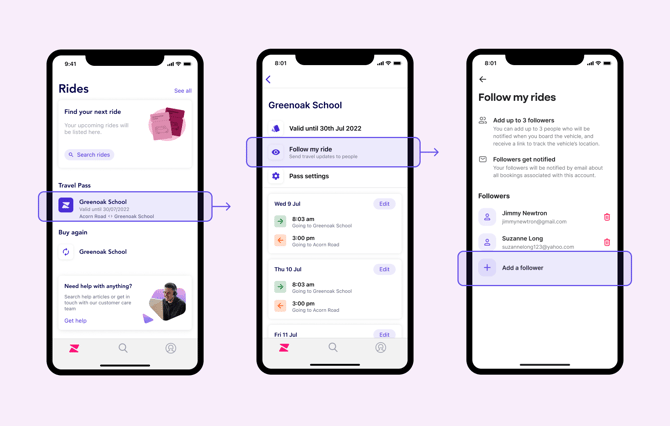
- You can add up to three followers to your account. Followers receive live email updates and a live tracking link for trips in progress. This also includes boarding and disembarking notifications.
- Followers cannot make or edit bookings, only the main account holder can manage this
Notifications you will receive as a follower (by email only)
- A reminder 45 minutes before the trip begins, including a link to track the vehicle
- Notification when they successfully board the vehicle
- Notification when they're successfully dropped off at the destination
- Notification when a rider doesn't board a trip that they're booked on to
- Notification of incident or delays via push notification (if this is activated on the mobile device)
If a rider doesn't board a trip they're booked on to (for example, because they're not attending school that day), you will receive a notification when the driver departs from their pickup stop. To avoid this, please cancel the booking in advance if your child is unable to travel. This ensures the driver is not left waiting, keeps the trip on schedule, and keeps the passenger list up to date. To avoid this, please always cancel the booking if your child is unable to board so that the driver is not waiting for them, delaying the trip and has an up-to-date passenger manifest.
How to add followers
-
In your Travel Pass or Ride Bundle, tap 'Follow my rides' wour Managing Notifications help article you'll be able to add up to 3 followers' contact details. You can also edit their details and remove them at any time.
What should I do if I'm not receiving notifications?
Please check your email spam folder first. If you're still not receiving notifications, please make sure that you have been successfully added as a follower to the correct pass or bundle.
How to Turn Off These Notifications
Please refer to this help article for more information here